










Error: dunzips32.dll
-
You must have read access to that file in PowerArchiver directory - with normal installation it should work fine, but probably admin set that only POWERARC.EXE can be read/executed.
Check you premissions for C:\Program Files\PowerArchiver folder and files inside.
-
I am getting this error, too:
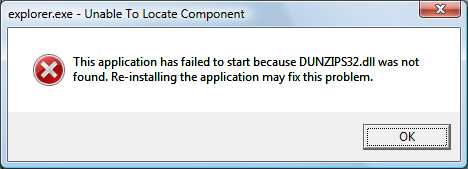
"explorer.exe - Unable to Locate Component
This application has failed to start because DUNZIPS32.dll was not found. Re-installing the application may fix this problem."
This is on Windows Vista and happens sometimes when right-clicking on a file in Explorer.
Is there any solution for this?
-
I am getting this error, too:
"explorer.exe - Unable to Locate Component
This application has failed to start because DUNZIPS32.dll was not found. Re-installing the application may fix this problem."
This is on Windows Vista and happens sometimes when right-clicking on a file in Explorer.
Is there any solution for this?
what version of PA are you using?
-
Hi Spwolf -
I am the original poster, although I have had to use a different forum account, due to getting a “you do not have permission to access this page” error from the PowerArchiver forum.
I no longer have PowerArchiver installed (although I continue to get this annoying error condition).
I downloaded PowerArchiver from downloads.com sometime in August, if that tells you anything about what version I was running.
Thanks in advance for any constructive suggestions.
-
This string has had more than 2,100 views(!). Wow.
-
are you sure you are not missing that file as part of Windows installation? That file is installed by Windows as well, although under C:\Windows folder.
thanks,
-
spwolf -
I checked just now, and there is no dunzips32.dll in c:\windows.
Suggested next step?
-
can you write down complete error message you get?
thanks,
-
maybe an screenshot?
-
Here’s the screen shot. I hope that I uploaded it correctly.
By the way, I incorrectly said that I was the original poster. I am not. I posted as hatesfandango.
Thanks for your help!
-
-
spwolf, thanks very much for the hint as to what the problem is, and davidsplash, thank you very much for providing a link to a dunzips32.dll that I can download. I was not able to find that by googling, for some reason.
It will take several days to be sure that this fixes the problem, because it didn’t happen all of the time, but I’m optimistic that you’ve solved it.
Thanks!
-
davidsplash, I downloaded the file at the URL you provided and rebooted, but I’m still getting the error.
I noticed that the file at that URL is called dunzip32.dll, not dunzips32.dll, the latter of which is named in my error messages.
Perhaps dunzip32.dll is the generic Windows file, while dunzips32.dll is a PowerArchiver file? I’m just guessing…
Any more suggestions?
Thanks.
-
try renaming the file to the one in your error message
if that works good if not search for it in the registry and delete that entry.
-
you can install PA 2007 and use .dll from there…
-
davidsplash, that’s a great idea, and I renamed the file today. I’ll let you know if it works.
Does anyone know what is supposed to be in c:\Windows for Vista Home? Is there supposed to be a dunzips32.dll there (without PA installed)?
-
its somewhere under C:\Windows, dont know where exactly…
-
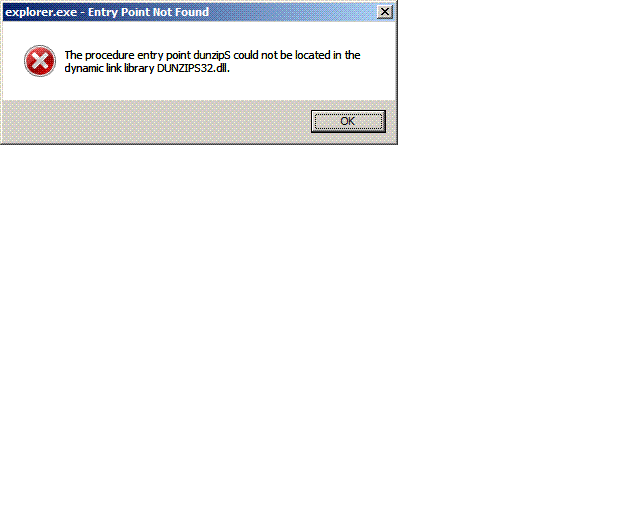
davidspliash, unforunately, when I rename c:\windows\dunzip32.dll to dunzips32.dll, I get the error shown in the attachment (hopefully, I did not mess up when I attached it).
I’ll see whether I can summon up the nerve to do registry surgery.
Does anyone know whether Vista Home is actually supposed to have such a file in c:\windows and, if so, what it is supposed to be called?
Thanks.
-
Again, with attachment this time (I hope).
-
