










External cd/dvd drive not working properly with PA Burner
-
I can confirm a freezing issue with PA’s internal burner. I tried it last night…with no data on the disc. I selected just 2 mg of data for burning…and proceeded with burning onto DVD. It stops at 93% and my disk drive light continually flashes. I had to manually stop the PABurnTools process in TaskManager. Then to get my DVD rom drive back…I had to disable the power supply.
I’m thankful it was an external DVD drive that I used instead of the internal one - as otherwise I would have been forced to reboot the computer just to get the DVD out of the drive.
So as of right now…and today is August 11th, 2009 - I see no official response on the problem. We need an update on the DVD burning issue otherwise this feature is non existent now…at least for me. I have to go back to XPCD Burner for now.
-
I can confirm a freezing issue with PA’s internal burner. I tried it last night…with no data on the disc. I selected just 2 mg of data for burning…and proceeded with burning onto DVD. It stops at 93% and my disk drive light continually flashes. I had to manually stop the PABurnTools process in TaskManager. Then to get my DVD rom drive back…I had to disable the power supply.
I’m thankful it was an external DVD drive that I used instead of the internal one - as otherwise I would have been forced to reboot the computer just to get the DVD out of the drive.
So as of right now…and today is August 11th, 2009 - I see no official response on the problem. We need an update on the DVD burning issue otherwise this feature is non existent now…at least for me. I have to go back to XPCD Burner for now.
there will be an update to the burner, but it doesnt not guarantee that your specific issue will be fixed, as it is probably specific to the drive you used.
Can you please try using your internal drive and see if it works.
-
you should also open an ticket with suppor at conexware dot com. That way we can get more specific info if/when needed.
thanks
-
there will be an update to the burner, but it doesnt not guarantee that your specific issue will be fixed, as it is probably specific to the drive you used.
Can you please try using your internal drive and see if it works.
I’m not going to do this because if the freezing issue can be duplicated on my internal drive…I won’t be able to get the disc out if the lights flash like they did with the external drive. I’d be forced to literally reboot the computer.
As there appears to be an update coming to “fix” this issue…I’ll wait for that before deciding on what to do. In the meantime…I’ll stick to USB flash drives.
-
I’m not going to do this because if the freezing issue can be duplicated on my internal drive…I won’t be able to get the disc out if the lights flash like they did with the external drive. I’d be forced to literally reboot the computer.
As there appears to be an update coming to “fix” this issue…I’ll wait for that before deciding on what to do. In the meantime…I’ll stick to USB flash drives.
as i said, it is generic update, i doubt it will fix your specific problem. Every cd/dvd drive has little hole near the loading tray into which you can insert an clip to manually eject the drive.
-
as i said, it is generic update, i doubt it will fix your specific problem. Every cd/dvd drive has little hole near the loading tray into which you can insert an clip to manually eject the drive.
Not if the drive lights are flashing…I think.
Edit: just a thought…is there consensus that it could be antivirus programs causing the freezing issues? I’ve been hearing about antivirus problems…and I’m wondering if the freezing could be a result of the antivirus software blocking the burning process on PABurnTools?
-
Not if the drive lights are flashing…I think.
Edit: just a thought…is there consensus that it could be antivirus programs causing the freezing issues? I’ve been hearing about antivirus problems…and I’m wondering if the freezing could be a result of the antivirus software blocking the burning process on PABurnTools?
nobody knows until you test it out :). AV’s could cause all kinds of troubles.
Poke that little hole with a clip and it will eject the drive always, its fully manual control (made so it works if your drive breaks or you are out of power)…
-
You mentioned the coming update will be generic. Is it customary to only say updates are generic…or can you issue change logs to alert users what has been fixed, etc?
-
You mentioned the coming update will be generic. Is it customary to only say updates are generic…or can you issue change logs to alert users what has been fixed, etc?
we wont know if your issue is fixed if you dont want to test it, it would be impossible to do without your cooperation.
-
I have more information and this part is interesting so listen carefully. I was able to “try” burning using my external DVD rom drive previously. It froze PA2010.
Now…I just tried to duplicate what happened before…but now PA2010 doesn’t even see my external DVD rom drive anymore. Instead…it only “sees” my internal one.
Just to be sure I wasn’t having a “hardware not found” issue in Windows XP…I did a search to see what was recognized on my system. Windows XP correctly lists my external DVD rom drive as visible. But PowerArchiver 2010 could no longer see it. So…just to be sure…I fired up my opensource CD burning software and did a check using that program.
I did a quick test burn on it and it was quickly able to see and read the same 2 mg of files I wanted for a test burn on a CD-RW disc. Took less than 30 seconds. It read it fine.
So…it appears to be a problem with Power Archiver 2010 not being able to read external CD/DVD rom drives plugged into USB ports. This is as far as I can go to narrowing down the problem currently with PowerArchiver 2010 on my system with the burning freezing issue.
Edit: more information -
1. PowerArchiver is “seeing” external DVD drive correctly in list view. But when I open the burner dialog box to select files for inclusion for a burning session…it’s only seeing the internal DVD rom drive in the drop down list. Another thing…when I put a CD/DVD into my external drive…the list view changes from seeing a DVD RAM drive…to a CD rom drive?! When I selected the CD ROM drive…it froze PowerArchiver and I had to do the three finger salute to regain control of my system.
Conclusion: this is definitely a Power Archiver 2010 issue. If my opensource software can read and burn files correctly while Power Archiver 2010 can’t even see my drive correctly then something is wrong.
-
I have more information and this part is interesting so listen carefully. I was able to “try” burning using my external DVD rom drive previously. It froze PA2010.
Now…I just tried to duplicate what happened before…but now PA2010 doesn’t even see my external DVD rom drive anymore. Instead…it only “sees” my internal one.
Just to be sure I wasn’t having a “hardware not found” issue in Windows XP…I did a search to see what was recognized on my system. Windows XP correctly lists my external DVD rom drive as visible. But PowerArchiver 2010 could no longer see it. So…just to be sure…I fired up my opensource CD burning software and did a check using that program.
I did a quick test burn on it and it was quickly able to see and read the same 2 mg of files I wanted for a test burn on a CD-RW disc. Took less than 30 seconds. It read it fine.
So…it appears to be a problem with Power Archiver 2010 not being able to read external CD/DVD rom drives plugged into USB ports. This is as far as I can go to narrowing down the problem currently with PowerArchiver 2010 on my system with the burning freezing issue.
Edit: more information -
1. PowerArchiver is “seeing” external DVD drive correctly in list view. But when I open the burner dialog box to select files for inclusion for a burning session…it’s only seeing the internal DVD rom drive in the drop down list. Another thing…when I put a CD/DVD into my external drive…the list view changes from seeing a DVD RAM drive…to a CD rom drive?! When I selected the CD ROM drive…it froze PowerArchiver and I had to do the three finger salute to regain control of my system.
Conclusion: this is definitely a Power Archiver 2010 issue. If my opensource software can read and burn files correctly while Power Archiver 2010 can’t even see my drive correctly then something is wrong.
my head hurts now :)
Were you previously burning files via PowerArchiver to your external dvd drive or not? (when it crashed at 93%).
Also, when you say in list view, you mean in explorer view in PowerArchiver or where exactly? Where did you exactly select CD ROM drive and PowerArchiver froze?
thanks :)
-
I was trying and still am trying to burn files onto my external DVD rom drive connected to the USB port. Just to be clear…
1. My opensource software burner can read and burn files correctly onto the external DVD drive perfectly.
2. Power Archiver 2010 CANNOT read or see the external DVD drive when I hit the Burn button and the drop down list ONLY shows the internal DVD burner.
3. PowerArchiver 2010 can ONLY see the external drive listed correctly in Explorer mode/List view mode. It’s in effect…able to see it but can’t use it for burning jobs. But the internal DVD drive is readable and recognized for burning jobs.
My problem is why can PowerArchiver ONLY read my internal drive correctly for burning jobs…but is ALSO able to see I have ANOTHER DVD rom drive on the USB port…but I can’t use THAT one for burning jobs. Keep in mind…my opensource software package can see BOTH drives and can burn jobs on the external drive. Power Archiver 2010 can’t burn on the external drive…even though it lists it in Explorer view/list mode.
-
explorer view has apsolutly nothing to do with burner, it is just an wrapper over standard windows controls which show drives available on your computer. What happened with PowerArchiver freezing when trying to read that external drive from post above?
PowerArchiver has apsolutly nothing to do with your other burning software which may be working perfectly. So lets get that out of the way please.
Now, when it comes to the PA Burner and your external drive. Did it EVER recognize the drive? Or did it simply not work ever?
-
explorer view has apsolutly nothing to do with burner, it is just an wrapper over standard windows controls which show drives available on your computer. What happened with PowerArchiver freezing when trying to read that external drive from post above?
PowerArchiver has apsolutly nothing to do with your other burning software which may be working perfectly. So lets get that out of the way please.
Now, when it comes to the PA Burner and your external drive. Did it EVER recognize the drive? Or did it simply not work ever?
It briefly recognized the external drive the first time I used it when I tried the first burning job. After the first burning job didn’t work…it no longer reads the drive for CD/DVD jobs.
-
ok great, we will start from there :).
We will have an internal build with new burning engine within few days and we will let you know via this thread where to download it.There are million possible issues when it comes to cd/dvd/bd burners, they are all slightly different and there are 3 different interfaces we can use to burn files, this all contributes to the issues with specific burners. We do have very extensive logging support just for this.
thank you,
-
ok great, we will start from there :).
We will have an internal build with new burning engine within few days and we will let you know via this thread where to download it.There are million possible issues when it comes to cd/dvd/bd burners, they are all slightly different and there are 3 different interfaces we can use to burn files, this all contributes to the issues with specific burners. We do have very extensive logging support just for this.
thank you,
I have good news. I did a Windows XP reboot and now PowerArchiver 2010 can see and read the external DVD drive correctly. Whew! That was close.
Now comes the hard part…narrowing down why the freezing happens.
Here’s an interesting question…
1. Do I put the DVD/CD in the external drive BEFORE hitting the Burn button on PA2010 when I need to run a burn job? Would this help prevent PA2010 from “skipping” to reading the drive contents more accurately?
-
I have good news. I did a Windows XP reboot and now PowerArchiver 2010 can see and read the external DVD drive correctly. Whew! That was close.
Now comes the hard part…narrowing down why the freezing happens.
:-)
I pretty much figured out that was the case (needed an reboot).
You do need to try to burn to internal drive, that will narrow down issue to the external drive (vs everything else).
-
:-)
I pretty much figured out that was the case (needed an reboot).
You do need to try to burn to internal drive, that will narrow down issue to the external drive (vs everything else).
Ugh! I was hoping to save the internal DVD drive for only emergency situations like reinstalling the OS. I’ve become paranoid about this because if one uses the internal DVD drive to the point of exhaustion you’d be forced to bring in your box to having it serviced to install a new one. This just inconveniences your time to do this.
I’ll try burning a DVD using the internal one.
-
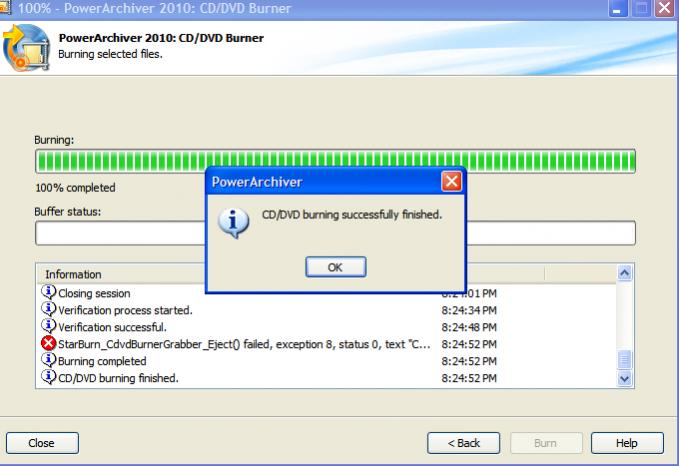
I’ve attached a screenshot showing PA2010 successfully did a test burn on my internal DVD drive. So…that part has been removed from consideration.
-
Uh…fellas? I’m still waiting for the build to fix the burner freezing issue. Although I’m able to burn using my internal DVD drive…doens’t mean this problem is fixed. I have an external DVD burner that I’d like to use for primary burning jobs.
