





Unmount virtual drive
-
are there any plans in the pipeline to implement an option to unmount a virtual drive by means of a systray icon perhaps whereby I could just right click it and tell it to unmount?
or have I perhaps missed the boat here and someone else has possibly requested it?
I couldn’t see anything in my search for such an option….figured lots of members may find this option useful. -
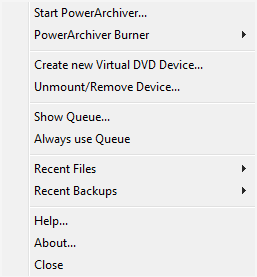
If you use PA starter the option to Unmount/Remove Device is already there.
-
thanks Luxor…I forgot that option even existed.
-
:)
-
I was also vainly looking for an unmount feature.
Am sorry and maybe I should be ashamed of myself, but … PA Starter ??
Right now I am using the rmb to mount an .iso, but am using Directory Opus, rmb->virtual drive to unmount it.
Wished that
a) a fixed drive letter cud be configured e.g. ‘Z’
b) unmount be available in the context menu
or at least optionally add this to the context menu.
(wishlist?)thank you!
-
PA Starter is in your Powerarchiver directory…
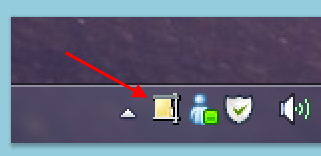
it’s an *.exe file (PASTARTER.EXE)after you run PA Starter the icon indicated in the screenshot will show in your systray…right click on it and all your options are in the menu.
-
Thanks a lot!
Frankly, I ‘forgot’ this option :o as I disabled PA to startup at PC boot in order to cut down autostarting applications to a minimum.Still - as after all the unmount-option is in fact available - I keep on hoping that that the developers will also make it available to be added to the usual context menu…
and also have an option to assign a driveletter when mounting. Reason for asking this is that I have external drives that I sometime use (for backups). PA is taking the first free driveletter, which I have assigned to one of the ext.drives.
Consequently I should go into Windows Control to re-assign driveletters.Anyway, thanks again!
-
yep I agree it would be handy in the context menu…
as I to disabled PA Starter to minimise autostarting applications. -
thanks for the info…I’ll check it out.