






Faster startup and close times in PA 2017
-
@nikkho said in Faster startup and close times in PA 2017:
On my side, first load of PA 17.00.69 x64 from the SSD drive is same as you, 2-3 seconds. Next loads, are about 1,5-2 seconds.
As comparison, 7-Zip takes about 0,5 seconds, and WinRAR 1 second on first load. I would say your points look good. Moving outside the EXE file everything which is not mandatory for PA, and loading them when needed at runtime, will improve things a lot.
Also for PNG files as well as other resources, you can use FileOptimizer, which I am the author, by the way: http://nikkhokkho.sourceforge.net/static.php?page=FileOptimizer
You should be able to reduce them about 20%-30%, not a big deal, but an improvement considering the effort to optimize them is almost zero.
pngs are already tiny… problem is access time - there are hundreds and loading each takes time, so overall there is a massive difference when they are outside (PA will load in 6+ seconds).
Overall, for computer like yours, it will make no difference with all the tests we did so far (and we spent few months early in the release just optimizing). But maybe there will be a difference on computers where disk is always doing something and thus PA loads in 4-5s.
We will have to test it to make sure.
Overall, maybe for PA 2018 we move for different skinning/toolbar solution, we could possibly eek another 0.2s-0.3s by that, without losing any features.
But maybe solution with hiding it in bg/tray would be most interesting one. We have to spend some time checking it out. Thanks!
-
Another idea to reduce startup time, is to optimize embedded resources. For instance:
- MAINICON.ico is 292.878 bytes and when FileOptimized, it gets down to 33.961 bytes.
- DXDOCKINGVS2005TARGET.bmp is 23.906 bytes and when FileOptimized, it gets down to 3.260 bytes.
-
I came exactly to submit a wish for faster startup time! Glad I found this thread. I benchmarked the startup time using the PassMark AppTimer and the following settings:
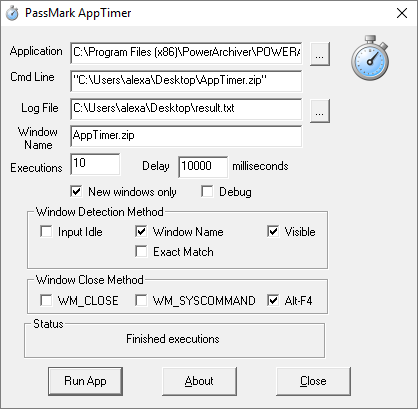
Note I needed to open a small zip file, otherwise the window would get recognized immediately without even being visible. This will open/close PowerArchiver and log the startup times.
I got these results with PA2016:
C:\Program Files (x86)\PowerArchiver\POWERARC.EXE - 10 executions
5.5576
5.5796
5.6077
5.6391
5.4462
5.7956
5.7484
5.8043
6.0803
5.9100
I got these results with PA2017 (x64):
3.8749
3.6198
3.8846
3.9920
3.7549
3.7141
3.7790
3.7693
3.7528
3.9696A significant improvement with 2017!! Thanks. I think the idea of recycling the instance by putting it in the tray is a great idea.
-
@alexmiller what kind of cpu and OS do you have? I will somehow send you x86 to test on that setup too, it will be interesting to see :)
thanks!
-
@spwolf I’m lucky to have a beast system: Dual Xeon E5-1650 3.2Ghz. I’m running latest Win10 Pro build 15063.
As I read above, you are developing with Delphi? I don’t know what skinning technology you are using, but have you tried the DevExpress VCL controls and skinning technology? Perhaps it is more performant… I use their .NET controls suite and i’m very satisfied.
-
After lurking in the PA install folder, i’m pretty certain you already use DevExpress controls.
-
@alexmiller said in Faster startup and close times in PA 2017:
After lurking in the PA install folder, i’m pretty certain you already use DevExpress controls.
yes, it is all devex controls, and they are beautiful and a bit slow.
-
@nikkho wrote this in for PA 2018 :)
btw, hows closing speed of alpha?
-
@spwolf Closing speed is perfect. It happens instantaneously.
-
@nikkho thanks for letting me know.
-
@spwolf for the image loading, since streaming data off HDD can be slow compared to handling images in memory, would combining all the images into an image atlas (one large image) and mapping the pixel locations to things instead be faster on startup?
Similar to how minecraft stores it’s game textures in one large image file. Then you’re only loading 1 image file off the hard drive instead off hundreds. -
@aluminumhaste said in Faster startup and close times in PA 2017:
@spwolf for the image loading, since streaming data off HDD can be slow compared to handling images in memory, would combining all the images into an image atlas (one large image) and mapping the pixel locations to things instead be faster on startup?
Similar to how minecraft stores it’s game textures in one large image file. Then you’re only loading 1 image file off the hard drive instead off hundreds.so how come you dont have PA 2018 preview already? Should I send it over. Its fast. Faast!
-
@spwolf I used to try the Alpha a few years ago, don’t know why I stopped. Sure, glad to try it out.
-
Loading testing completed:
Powerarchiver 2017
1.38 sec
1.46 sec
1.35 secPowerarchiver 2018 - Alpha
0.53 sec
0.63 sec
0.60 secClosing has always been fast on my computer, 2018 is almost instant.
-
@aluminumhaste thats pretty fast for 2017 too… when memory gets more fragmented during days of use, 2018 will go to 0.8s while 2017 will do something like 2.3-2.5s. At least from my experience.
Then if disk is doing something else in the background, we could have 2018 doing 1.3-1.5s while 2017 does 3.5-4s on same computer and ssd.
thanks for testing, how does it feel?
-
Snappy, fast, quick.
-
I tried PA 2017 portable, on work computer takes about 5 seconds to open
-
@aluminumhaste said in Faster startup and close times in PA 2017:
I tried PA 2017 portable, on work computer takes about 5 seconds to open
should be less than 2s in PA 2018… i dont think Portable is any slower, it is just different computer and possibly memory fragmentation after long running.
-
This is a work computer so yeah, also was loading that off of a USB flashdrive.
-
Check latest PA 2018 build, and compare the speeds to 2017, 2016, etc.
New version: PowerArchiver 2018 18.00.23 - BETA 1
Download: http://dl.powerarchiver.com/2018/powarc180023.exethanks!