

Zte 1.00.17 alpha testing!!!
-
@Sir:
the reply fix is this reference 2003 issues? or in general?
I wont be in work till next week, i can then install it and check it out… i am going to install on my home system with office 2010.
maybe…
-
@Sir:
the reply fix is this reference 2003 issues? or in general?
I wont be in work till next week, i can then install it and check it out… i am going to install on my home system with office 2010.
to answer you better, we worked on all reproducible issues we could found, and fixed them, so there is possibility that one of those also fixed your issue… lets see!
-
1.00.14
http://dl.powerarchiver.com/zte10014.exe- added support for FTP upload from Outlook (so far worked only from shell)
- added support for choosing default FTP profile (used both in shell and Outlook)
- small improvements to AttachmentCloud upload and error handling
- more securitfy to overall application - you will need to reenter your AttachmentCloud login information because now it is stored in secure way
- bug fixes: images in shell extensions
-
Build 1.00.14
Improvements in the installation process are noticed!! the screens are central, it seems more stable doesnt hang etc.
In regards towards the ZTE Configuration Screen, this still doesnt centre on a dual screen.
I am waiting on the “error” bug to appear on the 2003 system.
-
1.00.15
http://dl.powerarchiver.com/zte10015.exe- problem with enabling FTP option in Outlook 2010 ribbon
-
Build 1.00.14
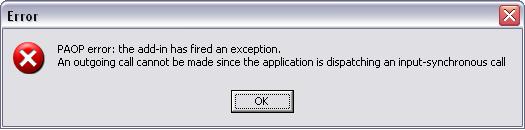
After a restart i received the same “Error” message as reports in prior models.
I was replying to an email from someone who had a picture as an attachment.
Ironicaly it was the email i sent to you drazen ;)
-
Hey Richard,
in .15 as well?
-
-
Has there been any changes to installer by any chance??
I tried installing over .14 and it’s stalled on “Removing Backups” / “Installing Zip To Email…”
-
Installed over .14 and got no errors (it has completed). Erased my FTP profiles again though.
-
noticed an issue with upgrading over previous installation or “repairing” the current once, logged in.
-
To those using AC, please go to Config, enter your AC login info and click OK.
Go back to config>AC options, has your AC password changed? -
Hey Mili,
I did this in the ZTE utility and it seems to have indeed changed or it is telling me to check my username/password.
-
Same happens here, for some reason the password changes. I wanted to confirm it with others to make sure it’s not just me, thanks for checking :)
Logged it in! -
1.00.16
http://dl.powerarchiver.com/zte10016.exe- fixed bug with messsing up AC password from ZTE Configuration
- small fixes
-
I didn’t encounter the password issue with this latest release Ivan…many thanks.
-
1.00.17
http://dl.powerarchiver.com/zte10017.exe- updated ONLY installation so when updating to .18 (future next release) from .17, there will be no bug with removing all registry entries and reseting configuration (e.g. AC login information, FTP profiles, …).
Be aware this bug will be fixed when upgrading to any new version after installing this .17. After updating from .16 to .17 there still might be loose of configuration.
P.S. The bug was also in PowerArchiver installations…
-
I have exactly the same problem as KarbonKopy.
I haven’t either received any e-mail activation and I have also checked my junk folder.
Please validate me too.
-
I have exactly the same problem as KarbonKopy.
I haven’t either received any e-mail activation and I have also checked my junk folder.
Please validate me too.
done… thanks!
-
Thanks spwolf, now it works! :)