Codename Windows 8 Dev - Issues
-
Just provide an update: Seems quite a few things I have installed do not automatically pick up the default viewer/app icons. You click on example a .pdf and then it asks what .pdf viewer out of the ones installed you like to open it with.
Am sure MS will improve explorer functionality by the Beta.
Regarding PA not come across any further issues :) -
You can check this installer here:
http://www.powerarchiver.com/test/alpha120/powarc120103new.exe -
let us know if this installs in Win8.
thanks!
-
let us know if this installs in Win8.
thanks!
Hi,
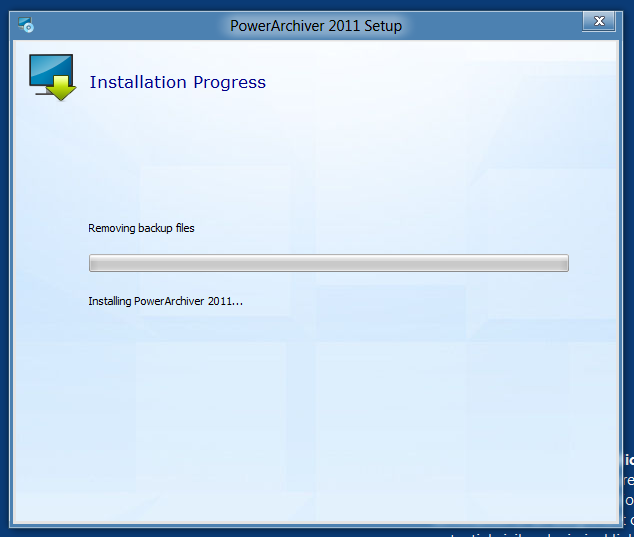
Just tested it on my VM for you. Unfortunately it sort of failed. It runs then stops with the error - after closing the error message it hangs on the final screen, removing backup files.
Hope this reply helps you.Error screen as included.
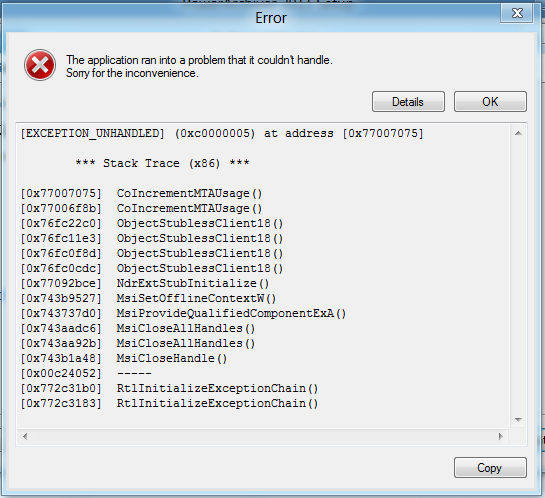
Error copied:
[EXCEPTION_UNHANDLED] (0xc0000005) at address [0x77007075]*** Stack Trace (x86) ***
[0x77007075] CoIncrementMTAUsage()
[0x77006f8b] CoIncrementMTAUsage()
[0x76fc22c0] ObjectStublessClient18()
[0x76fc11e3] ObjectStublessClient18()
[0x76fc0f8d] ObjectStublessClient18()
[0x76fc0cdc] ObjectStublessClient18()
[0x77092bce] NdrExtStubInitialize()
[0x743b9527] MsiSetOfflineContextW()
[0x743737d0] MsiProvideQualifiedComponentExA()
[0x743aadc6] MsiCloseAllHandles()
[0x743aa92b] MsiCloseAllHandles()
[0x743b1a48] MsiCloseHandle()
[0x00c24052] –—
[0x772c31b0] RtlInitializeExceptionChain()
[0x772c3183] RtlInitializeExceptionChain()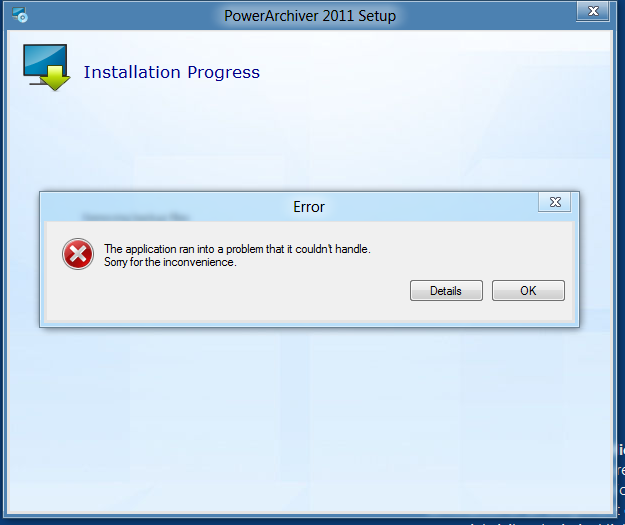
Windows 10 *64 - Latest TP (Fast)
-
thanks - we have reported this to our installer company.
-
No probs.
I have also just checked for you, as before - if the .msi is extracted that runs and installs fine.The only proviso to that ‘installs fine’ is what I believe a W8 issue where certain icons don’t show until initially selected with the open with dialogue. Once windows is informed example .zip is to open with PowerArchiver the icon shows for .zip
There are a few programmes that this icon issue happens with, so I personally believe nothing at this stage of W8 the icon issue is nothing to worry about - I would be more concerned if it was Beta…
-
@pjb:
Hi,
Just tested it on my VM for you. Unfortunately it sort of failed. It runs then stops with the error - after closing the error message it hangs on the final screen, removing backup files.
Hope this reply helps you.Error screen as included.
Error copied:
[EXCEPTION_UNHANDLED] (0xc0000005) at address [0x77007075]*** Stack Trace (x86) ***
[0x77007075] CoIncrementMTAUsage()
[0x77006f8b] CoIncrementMTAUsage()
[0x76fc22c0] ObjectStublessClient18()
[0x76fc11e3] ObjectStublessClient18()
[0x76fc0f8d] ObjectStublessClient18()
[0x76fc0cdc] ObjectStublessClient18()
[0x77092bce] NdrExtStubInitialize()
[0x743b9527] MsiSetOfflineContextW()
[0x743737d0] MsiProvideQualifiedComponentExA()
[0x743aadc6] MsiCloseAllHandles()
[0x743aa92b] MsiCloseAllHandles()
[0x743b1a48] MsiCloseHandle()
[0x00c24052] –—
[0x772c31b0] RtlInitializeExceptionChain()
[0x772c3183] RtlInitializeExceptionChain()Can you try running setup.exe that is next to the. Msi when you extract setup?
Much appreciated?
-
Hi,
I have extracted the file, and then ran the setup as requested from the extracted file.
It looked like it might go through quicker & ok, but then it failed. At a glance same error as before:[EXCEPTION_UNHANDLED] (0xc0000005) at address [0x761c7075]
*** Stack Trace (x86) ***
[0x761c7075] CoIncrementMTAUsage()
[0x761c6f8b] CoIncrementMTAUsage()
[0x761822c0] ObjectStublessClient18()
[0x761811e3] ObjectStublessClient18()
[0x76180f8d] ObjectStublessClient18()
[0x76180cdc] ObjectStublessClient18()
[0x76252bce] NdrExtStubInitialize()
[0x74839527] MsiSetOfflineContextW()
[0x747f37d0] MsiProvideQualifiedComponentExA()
[0x7482adc6] MsiCloseAllHandles()
[0x7482a92b] MsiCloseAllHandles()
[0x74831a48] MsiCloseHandle()
[0x00a04052] –—
[0x77d631b0] RtlInitializeExceptionChain()
[0x77d63183] RtlInitializeExceptionChain() -
thanks a lot!
-
Hi,
Please check if this improves it:
http://www.powerarchiver.com/test/alpha120/powarc120202.exe -
Just a quick thing i noticed… on a windows XP Pro SP3 OS.
When i downloaded 12.02.02… it said i didnt have admin rights… however, i do! so i uninstalled PowerArchiver and ran the Install again and it worked ok no issues…
So not sure if this is a bug, but it isnt allowing users to upgrade PA from Prior Versions.
EDIT: Just a quick note that on my Home Systerm Windows 7 Ultimate 32bit SP1 It updated the OS without an admin error message but then hung and prompted me to restart. After restart PA worked like a charm so no noticible curruption on install.
Sounds like the Install just needs updating, and checking on Older OS’s
-
@Sir:
Just a quick thing i noticed… on a windows XP Pro SP3 OS.
When i downloaded 12.02.02… it said i didnt have admin rights… however, i do! so i uninstalled PowerArchiver and ran the Install again and it worked ok no issues…
So not sure if this is a bug, but it isnt allowing users to upgrade PA from Prior Versions.
anyone else had the same weird issue?
-
-
anyone else had the same weird issue?
not ‘THAT’ particular message but I was forced to do a clean installation…
I tried on several occasions but it wouldn’t let me ‘upgrade’ -
not ‘THAT’ particular message but I was forced to do a clean installation…
I tried on several occasions but it wouldn’t let me ‘upgrade’well what error did you get?
-
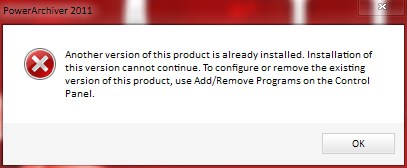
can’t recall it in detail…very lengthy message which just indicated that I couldn’t install over a previously installed version…at the time I assumed you as the dev team had instigated a ‘clean’ installation only.
I realise now that this wasn’t the case…the clean installation however had no hiccups whatsoever.
I could probably recreate if you wish by reinstalling previous version ?
-
can’t recall it in detail…very lengthy message which just indicated that I couldn’t install over a previously installed version…at the time I assumed you as the dev team had instigated a ‘clean’ installation only.
I realise now that this wasn’t the case…the clean installation however had no hiccups whatsoever.
I could probably recreate if you wish by reinstalling previous version ?
please do try! Works fine here… it shouldnt happen.
-
Did as requested and message did appear once again…see attached screenshot.
-
ah, so what version did you have before?
-
v12.02.01