










Corrupt backup archive. If VirtualStore\Program Files folder is selected.
-
size?
-
ok so it can not read the backup archive, can you open it manually after sucessful cration>
The one thing I forgot to try.
No problem after successful creation but If I try to open it after running it again I get Error: the Password is incorrect.anything specific? encryption? settings? etc?
Nothing special, fairly standard and I have used it a long time with no trouble.
Overwrite Previous File - No
Add Time Stamp - Yes
-D-M-Y
Use as suffixFormat: ZIP
Method: Deflate
Compression: Maximum
Backup Type NormalEncrypt with password - yes
Encryption method AES 256-bitI turned off encryption to see if that would make a difference.
It still asked for a password and was still full of errors.
I also tried Method: Optimized and Backup Type: UltraSize ?
Total 2,170 files, 113 dirs, 178,531 kB [125,811kB]
I created a new backup, adding 1 folder at a time between tests.
Results of this:
Total 38 files, 5 dirs, 32,501 kB [31,328kB] still working
Total 60 files, 6 dirs, 33,575 kB [32,018 kB] still working
Total 67 files, 8 dirs, 36,258 kB [34,618 kB] still working
Total 80 files, 9 dirs, 84,157 kB [76,157 kB] still working
Total 105 files, 13 dirs, 86,631 kB [76,734 kB] still workingNot a great number of files or directories and still working as you can see, so I stopped and created another new backup. This time selecting different folders with more in them.
Results of this one:
Total 58 files, 20 dirs, 1,731 kB [1,209 kB] still working.
Total 86 files, 22 dirs, 31,980 kB [30,415 kB] Fails with errors.Not as many files as the first one but more directories. Failed after the second folder was added.
Another new backup, 1 folder this time but a lot of files as you can see.
Total 1,062 files, 27 dirs, 52,998 kB [28,771kB] Fails with errors.Luxor
-
was the new try with encryption or without?
or do you think it is due to number of folders you added to the list? what if you add one folder with many subfolders?
or it might be due to name of certain folder?
-
was the new try with encryption or without?
With encryption.
or do you think it is due to number of folders you added to the list? what if you add one folder with many subfolders?
I was beginning to think that way Spywolf, but as you can see from the results above there was one with 105 files & 13 dirs that worked. One with 86 files & 22 dirs that failed. The last one 1062 files & 27 dirs that failed. So fairly mixed with differing results.
or it might be due to name of certain folder?
I really don’t know to be honest.
-
please check with official beta 1, and let us know if this has been fixed… thank you!
-
thanks for checking it out luxur when you have time, would love to get this for beta 2 at least….
-
Sorry for delay spywolf.
Still getting the same errors unfortunately.
-
you need to delete old file and try without encryption again.
it asks you for password becase it is updating old file, which was encrypted.
so you need to try updating non-encrypted backup…?
thanks!
-
New backup same folder structure as original.
Settings
Overwrite Previous File - No
Add Time Stamp - Yes
-D-M-Y
Use as suffixFormat: ZIP
Method: Deflate
Compression: Maximum
Backup Type NormalEncrypt with password - No
Ran backup. Extracted Ok.
Deleted what I had just extracted and ran the backup again.
Tried to extract but no luck, see screen shots 1,2,3,4,5 and 6
1 Almost the width of my screen. Clicked Yes
2 Too large for my screen. Clicked Yes
3 Too large for screen. Clicked Yes
4 Asks for password. Typed in password of usual backup.Message: Error the password is incorrect. as in screen shot 5.

Tried the password another few times, same message.
Hit Cancel then tried my usual password in the box once again, this time it extracted.
Screen shot 6 shows the folder contents after extraction.

Off now to bang my head against a wall.
-
luxor, do not bang your hand off the wall please… me and mili take a hit for you here :-).
can you create completly new backup and try it out? same result?
-
Ok, same folder structure slightly different result.
This time when attempting to extract I got the steps in screen shot 1 then as in screen shots 4,5 & 6.
No screen shot 2 or 3 this time.
Did another new backup.
This time only backed up My Documents folder.Size: 1,343 files, 105 dirs, 189,362kb [130,726 kb]
Backed up and extracted fine, ran again, extracted fine and again and again.
Note that there are no folders included from C:\Users\Username\AppData included in this back up. In all the failed ones there has been.
Luxor
-
ok, so maybe some specific filenames are casuing this issue… any particular appdata folders?
-
i think i found it, updating of zip files does not work via shell in certain conditions… reported it, should be fixed soon!
-
These are the main folders Spywolf
C:\Users\Username\AppData\Roaming\PocoMail
C:\Users\Username\AppData\Roaming\MailWasherPro
C:\Users\Username\AppData\Roaming\Opera\Opera\profile
C:\Users\Username\AppData\Roaming\FreeCommander
C:\Users\Username\AppData\Local\VirtualStore\Program Files\KeePass\(I’m not putting these spaces in the file names by the way, just when I pasted them in here that is occuring).
Of course most of folders these have many sub-folders.
-
i think i found it, updating of zip files does not work via shell in certain conditions… reported it, should be fixed soon!
Excellent, knew you would get there in the end. :p
-
send us an email via support form and i will send you an link to test version, if you have time…
thanks
-
Have done spywolf. No link yet though.
<drums fingers=“” impatiently=“”>;)Edit: And 2 minutes later I’m sent the link.</drums>
-
Well pretty much the same results with this test version.
Created a new backup:
SettingsOverwrite Previous File - No
Add Time Stamp - Yes
-D-M-Y
Use as suffixFormat: ZIP
Method: Deflate
Compression: Maximum
Backup Type NormalEncrypt with password - No
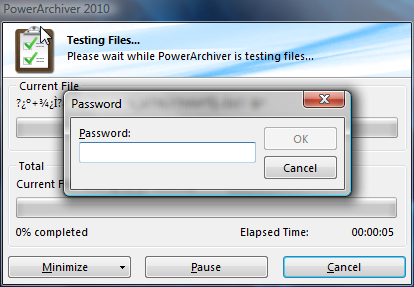
Ran, extracted. Ran again tried to extract. this time it took me straight to this screen asking for my password.
You can see in the screen shot just below where it says “Current File” that it is going to be full of errors anyway as it’s all strange symbols.Entered a password any way.
Message: Error the password is incorrect.
Hit cancel, used my normal password again and it extracted but result just like screen shot 6 in the previous post.Made another new backup this time encrypted with a password. Same result.
Even though I had set a password I still got the Message: Error the password is incorrect.
Hit cancel, retried password and it extracted to the same corrupt files.Luxor.
-
mili sent you b1 by mistake, thats not new version :-)
-
LOL that explains that then.


