










Backup problem Beta 5 German
-
ok… I am not sure what are we supposed to say - you can do it via daily option but you can also use windows scheduler… whatever you want…
thanks!
No, I want to say that I can ONLY do it via the Windows scheduler. The options in the PA do NOT work.
-
doing daily, and then selecting every 7 days instead of every day, does not work? Does it not save?
I tried it on Vista and seems to work fine?
-
doing daily, and then selecting every 7 days instead of every day, does not work? Does it not save?
I tried it on Vista and seems to work fine?
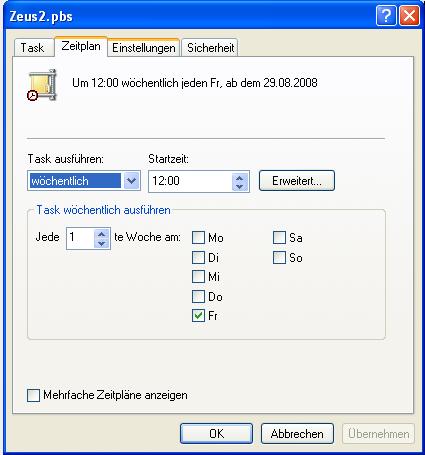
The problem is that I don’t have the option to select 7 days in the advanced setting (as you can see in my second screenshot). Please notice the difference in the window when I access the same page with the Windows Task scheduler as in the picture attached to this post.
And any selection in the normal setting window does not have any effect (see my first screenshot).
-
what do you get when you select daily backup and then advanced? Show me that screen please…
-
This does not help. See my screenshot for all available options.
And when I click on ‘Bearbeiten’ (Edit), the same page as in my first post opens. No option to change the day of the week or to modify the hour of creation.
Oh - misunderstood you.
The time is selected on the first screen.The weekly (or monthly) day of activation starts from TODAY - i.e. it uses the day of creation of the pbs as the beginning of the weekly/monthly schedule :p
However, you are correct, after changing time on the first screen the display of time under advanced does NOT change :confused:
Nor does it change the time of the scheduled task under windows/tasks :confused: -
what do you get when you select daily backup and then advanced? Show me that screen please…
Advanced is disabled for “daily backup” - clicking button does nothing.
-
Advanced is disabled for “daily backup” - clicking button does nothing.
you need to close pbs and try again, or do it through backup list schedule edit…
-
This is very confusing :(
Open/Edit existing pbs with schedule “Once a week @ 05:00”
Change schedule to “Once a day”
– Advanced Options :: no effect
Close pbs
Open/Edit pbs - schedule “Once a day @ 05:00”
– Advanced Options works :: “05:00 every day”
Change schedule to “Once a week” (leave time @ 05:00)
– Advanced Options works :: but “00:00 every Friday”
(so PA changed time to 00:00 but first screen still shows 05:00).
Close pbs
Open/Edit pbs - schedule “Once a week @ 05:00”
– Advanced Options works :: still “00:00 every Friday”So now Schedule and Advanced Options do not agree (time).
Now, change to “once a month” or “once a week”, doesn’t matter: Advanced always shows 00:00 - can open/close pbs as much as you want.Thus
- we cannot set the time for week or month backups.
- we cannot change the day of activation for week or month backups (always <today>using Day name or Date).
Edit: what is monthly date for September if create pbs on 31 August?
Would September backup be missed?</today> -
This is very confusing :(
Open/Edit existing pbs with schedule “Once a week @ 05:00”
Change schedule to “Once a day”
– Advanced Options :: no effect
Close pbs
Open/Edit pbs - schedule “Once a day @ 05:00”
– Advanced Options works :: “05:00 every day”
Change schedule to “Once a week” (leave time @ 05:00)
– Advanced Options works :: but “00:00 every Friday”
(so PA changed time to 00:00 but first screen still shows 05:00).
Close pbs
Open/Edit pbs - schedule “Once a week @ 05:00”
– Advanced Options works :: still “00:00 every Friday”So now Schedule and Advanced Options do not agree (time).
Now, change to “once a month” or “once a week”, doesn’t matter: Advanced always shows 00:00 - can open/close pbs as much as you want.Thus
- we cannot set the time for week or month backups.
- we cannot change the day of activation for week or month backups (always <today>using Day name or Date).
Edit: what is monthly date for September if create pbs on 31 August?
Would September backup be missed?</today>Are you trying to tell us we should simply ignore weekly and monthly options as they are right now and use daily option which can be customized to the point of being anything you want - 3 days, 7 days, 15 days, 30 days, etc…. ?
Seems like better option to me personally.
-
Are you trying to tell us we should simply ignore weekly and monthly options as they are right now and use daily option which can be customized to the point of being anything you want - 3 days, 7 days, 15 days, 30 days, etc…. ?
Seems like better option to me personally.
I think we should be able to configure:-
daily :- what time of dayweekly :- which day of week AND what time of day
monthly :- what time of day AND what date in month including e.g. last day of month (as a setting)
The day/date should not be fixed at<today>
The time should not be fixed at 00:00 nor at <now>.Maybe simplest to keep current fixed options for ease of use; and add a “custom” option which is fully configurable?</now></today>
-
Daily option is one that can be customized to whatever you need…
-
Daily option is one that can be customized to whatever you need…
So how do I create a backup with following schedules -
Today is Saturday 30 Aug 12:00
- Create weekly pbs to run at 06:00 on Thursday ?
- Create monthly pbs to run at 18:00 on 15th ?
Only way I see is to change PC date/time??
-
Please check RC1 via web update and let us know if everything works properly now.
thank you!
-
(meaning: if daily works)
-
Has there been any modification in the actual release? RC1 shows the same bad behaviour as Beta5 on my computer.
-
Has there been any modification in the actual release? RC1 shows the same bad behaviour as Beta5 on my computer.
nope, there is no time for that - you can configure daily option to whatever you want and you should use that…
we will improve on weekly/monthly in the first update after final is released…
-
Please try with final pre-release version:
http://www.powerarchiver.com/test/release10/powarc1100rc5.exeAnd let us know if this has been improved right away.
thanks!
-
p.s. confusion here was that Vista and XP schedule options are different - Vista’s worked ok, while on XP it did not (should work now when you click on Edit!)
